
TL;DR: Per-seat pricing doesn’t work for AI SaaS anymore - every AI query draws real compute dollars, and you feel it fast. What’s actually working now is hybrid pricing: a flat base fee for stability, plus add-ons that scale by usage or outcomes. That way, your margins don’t get eaten alive as customers lean hard into your AI. Below, I'll break down five actual pricing models, real stories from the field, a framework for figuring out your real costs, and the common mistakes that stealthily wipe out profit.
The $30 Question Nobody Saw Coming
Let’s rewind to the day Microsoft dropped Copilot for Microsoft 365 at $30 per user, per month - on top of what people were already paying. Suddenly, every SaaS founder faced the same dilemma: How do you charge for a feature that hits your bottom line every time someone clicks “run”?
Old-school SaaS was a dream. Build the platform, and every new user was almost pure gravy. Margins at 80-90%. You could charge per seat forever because it didn’t matter how much folks used your product - your costs barely changed.
AI? Total game-changer. Now every prompt, every little agent action, spins up computation that costs you money. And that cost isn’t clean or fair. One power user who runs massive multi-step workflows can cost you 50 times more than a casual user just asking a quick summary now and then.
And the numbers are brutal. An industry report for 2026 shows that 84% of SaaS companies lost 6% or more off their margins because of AI compute costs. Just look at Replit. Their gross margins went from a solid 36% to an ugly -14% almost overnight, thanks to AI-powered features burning through LLM credits way faster than they anticipated. Unmanaged AI compute has quietly become one of the biggest new SaaS revenue leaks.
You can’t push this problem down the road. If you build an AI-first feature inside your SaaS - or you’re starting from scratch - how you price it will either drive your growth or slowly strangle your finances.
Why Standard SaaS Pricing Breaks Down With AI
Let’s talk brass tacks: why doesn’t the usual SaaS playbook hold up?
The COGS Problem
Back in the day, your cost of goods sold (COGS) was mostly a fixed line - servers, basic infra, a bit of variable cost here and there. With AI, that flips upside down. Every time you hit an LLM API, fire up a GPU for inference, or chew through tokens, you rack up a direct, variable cost.
Most AI-first SaaS companies we see are operating at 50–60% gross margins, nowhere near the 80-90% you want. If the unit economics aren’t nailed down, margins can sink to 20–40% for early products.
When we help teams add AI features, we start with one thing: calculating cost-per-action. If you don’t know what each prompt costs you, pricing is a shot in the dark.
The Usage Variance Problem
With normal SaaS features, power users might use 5 times more than the average user. AI is a different beast - a heavy user could hit 100 times more compute spend than someone who barely touches it. Imagine a customer pushing piles of documents through your AI pipeline every day, versus one just poking at search once a month. The gap is massive.
If you stick with flat per-seat pricing, you either scare away light users (too expensive), or you get fleeced by heavy users who cost you way more than they pay.
The Value Alignment Problem
Not all usage is equal, either. Some companies get outsize value from your AI. Take customer support automation: an AI that closes 10,000 tickets a month is a way bigger deal to one team than one automating 100. Per-seat pricing doesn’t reflect that - the price is the same, so you miss revenue at the high end and face pushback at the low end.
Already shipped AI features and watching your margins slip?
We help SaaS teams pin down what every AI action actually costs - LLM inference, retrieval, infrastructure, and the third-party calls hiding inside each request - so you can see which customers and features are quietly eating your gross margin.
Book a free scoping call and we’ll map your true cost-per-action and show where your current pricing is leaking profit, with a clear set of fixes ranked by impact.
Five AI Pricing Models (With Real-World Proof)
Drawing on our work with AI-powered SaaS and from digging into over 50 pricing setups, here are five models that actually get the job done - and when you should (or shouldn’t) use each.
1. Usage-Based Pricing (Pay Per Action)
How it works: Customers pay for what they use - per API call, per token, per doc, per generation.
Who wins: API-centric products, developer platforms, core infra layers.
Real Examples:
- OpenAI charges per million tokens (GPT-4.1 is $2.50 for input, $10 for output)
- Anthropic prices Claude Sonnet 4.6 at $3 in, $15 out per million tokens
- Twilio Segment counts each tracked event
Upside: Direct tie between revenue and costs - you’ll always protect your margin. Downside: Customers hate uncertain bills, especially big enterprises. No one likes opening an invoice they can’t predict.
When to use: If you sell to technical buyers who “get” usage-based billing and your costs per action are predictable enough that customers aren’t constantly surprised.
2. Credit-Based Pricing
How it works: Customers buy or receive a bundle of credits each month. Each AI operation burns different credits based on how much it costs you.
Who it’s for: Products that offer a mix of AI features with different cost profiles.
Real Examples:
- Adobe sells AI credits in bundles from $10 (1,000 credits) up to $200 (50,000 credits), raking in $125M in standalone AI revenue
- Jasper bakes credit allocations into each subscription tier for content generation
- Canva puts Magic Write credits into their Pro and Enterprise plans
Why it helps: Credits hide the messy math behind the scenes. Need a quick text summary? That’s 1 credit. Want to generate an image? That’s 5. Step up to a complex agent workflow? Maybe 20+. This way, you can set pricing that matches your real costs - without users asking how many “tokens” they just burned.
Here’s the basic playbook we usually build for credits:
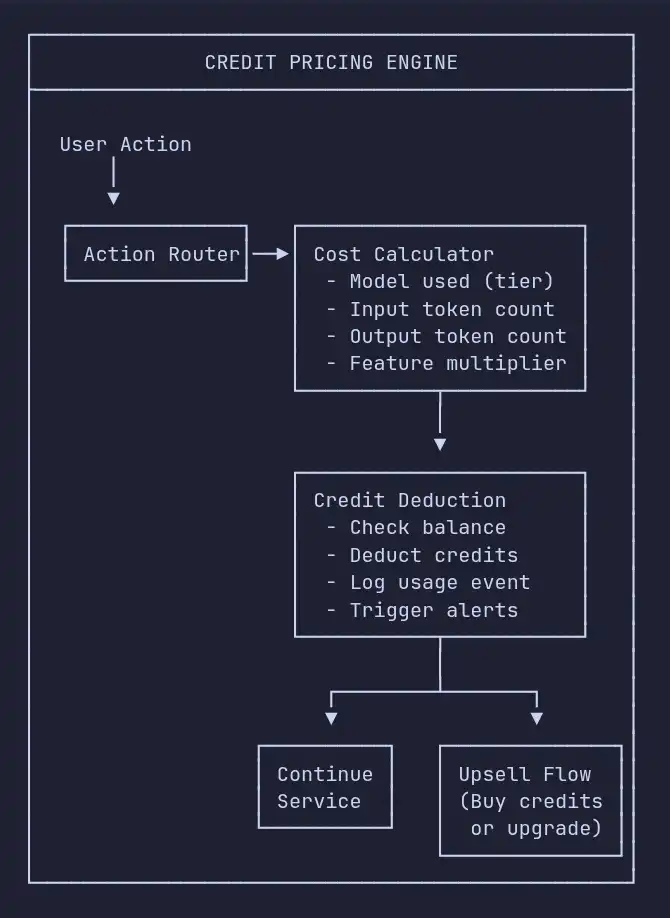
The crucial decision here is how you set the exchange rate between credits and the actual AI actions your product performs. What’s worked well for us: grouping actions into three or four complexity tiers - think simple, standard, advanced, and premium. That way, you get enough granularity to protect your margins, without confusing or overwhelming your buyers.
3. Outcome-Based Pricing
How it works: Customers only pay when your AI actually gets something done - solving a support ticket, qualifying a lead, finishing a workflow. Payment follows real, measurable results.
Best for: AI products that handle specific jobs and have clear, easy-to-track metrics of success.
Real-world examples:
- Intercom’s Fin charges $0.99 every time the AI resolves a conversation
- HubSpot’s Customer Agent shifted to $0.50 per successful resolution in April 2026
- Zendesk sits at $1.50–$2.00 for each automated resolution, depending on customer commitment
- Sierra AI prices their customer agents entirely based on outcomes
Why it’s powerful: Outcome-based pricing keeps incentives perfectly aligned. Customers only hand over cash when your AI actually delivers value. It takes the friction out of selling - “You pay when it works.” And it’s just as simple when it comes to renewals. If your AI isn’t delivering, customers aren’t paying - and they’re not churning just because they’re stuck with bills for results they never saw.
The risk: All the downside lands in your lap. If your AI needs to try three times (and runs three expensive inference calls) to resolve a single ticket, you’re eating those extra costs. You need solid AI performance, and you need to keep a very close eye on your COGS.
When we recommend it: Go for this if you can clearly define and measure “outcome,” if your AI’s hitting a high success rate (above 70%), and if that outcome maps straight to value your customer already recognizes - tickets closed, leads found, documents finished.
Outcome pricing only works if the agent behind it actually finishes the job - at a high enough success rate that you’re not eating the cost of three retries per win. Our guide to building AI agents for SaaS covers the architecture, evaluation, and cost controls that make per-outcome pricing safe to offer.
4. Tiered Subscription with AI Limits
How it works: The classic SaaS subscription model, but every plan includes a set chunk of AI usage. Hit your limit and you either pay overage fees or upgrade.
Best for: SaaS companies adding AI on top of their base product.
Real examples:
- Notion bundles AI features in the Plus plan, with a cap on AI responses per member
- GitHub Copilot offers everything from Individual ($10/month) to Enterprise ($39/month), each with different models and usage ceilings
- Grammarly slices up different levels of AI writing help by subscription tier
The trade-off: It's the easiest path for legacy SaaS products - you don’t have to rip apart your billing system. But you risk setting limits too high (which destroys your margins) or too low (so customers quickly get frustrated and blocked).
When we recommend it: Choose this when AI is just adding a little extra muscle to your main product - not when AI is the star. And you’ve got to set your limits high enough that 80% of users never notice, while making sure the top 20% still feed your upsell engine.
5. Hybrid Pricing (The 2026 Standard)
How it works: Start with a base subscription for predictability - users get a solid AI allocation. If someone blows past it, charge them per action or per credit. Bigger customers can lock in better per-action rates at higher tiers.
This is where the market’s landed. By 2026, 41% of AI vendors used hybrid pricing (up from 27% in 2025) according to Bessemer’s AI Pricing Playbook. Among established SaaS adding AI, 65% went with a “seats plus usage” setup.
Why hybrid wins: Everybody benefits. Customers get a predictable bill. Vendors keep their margins by charging for overages. Upsells take care of themselves - if users need more, they pay more, with no arm-twisting.
Real implementation: When we build AI-powered SaaS products, our default recommendation is a three-tier hybrid structure:
| Tier | Base Price | AI Included | Overage Rate | Target User |
|---|---|---|---|---|
| Starter | $49/mo | 500 actions | $0.10/action | Small teams dabbling in AI |
| Growth | $149/mo | 2,500 actions | $0.07/action | Teams getting serious about AI |
| Scale | $399/mo | 10,000 actions | $0.04/action | Heavy AI users |
Adjust the numbers as you see fit. The structure matters most: cover the AI usage for most users (about 80%) at each tier, and make sure overage pricing keeps your margins healthy but doesn’t make power users feel punished.
Not sure which of these pricing models fits your product?
We’ve helped founders choose between usage, credit, outcome, tiered, and hybrid pricing across dozens of AI products - matching the model to how customers buy, how variable the costs are, and whether AI is the core product or an enhancement.
Book a free scoping call and we’ll map your product to the right pricing model and tier structure, with realistic numbers you can launch - without overbuilding or underspending.
The Cost Framework: Pricing from the Inside Out
Here’s how we help SaaS founders figure out AI pricing. Looking at competitors gives you a starting point, but digging into your own costs is what actually keeps you profitable.
Step 1: Map Out Your Cost Per AI Action
Break every AI-powered feature down by exactly what it costs to run, piece by piece.
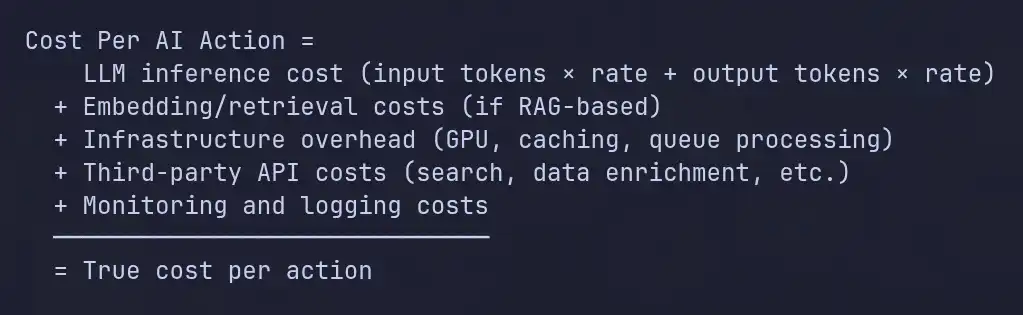
In 2026, the price of running large language models has fallen fast - down about tenfold each year since 2022. Now you can get GPT-4-level power for around $0.40 per million tokens, where it used to be $20 not that long ago. But here’s the trick: don’t set your prices based on what things cost today. Price at your current cost plus some margin for safety. As your costs drop, you pocket the difference.
Step 2: Define Your Target Margin
Typical SaaS companies aim for gross margins above 80%. With AI features, though, it’s better to start around 60-70%, then push toward 75% or more as you get smarter about cutting inference costs. Here’s how:
- Model routing: For most tasks, send requests to a smaller, cheaper model. Only use the big, expensive one for tough jobs. This move alone slashes costs by 40-60%.
- Prompt caching: Store the most common prompt types so you’re not wasting money running the same thing over and over. This shaves 20-30% off in products where people repeat themselves.
- Response caching: If the answer doesn’t change, just return the cached result and skip paying for another run.
- Batch processing: When speed isn’t everything, bundle requests together for a better rate.
Step 3: Figure Out Your Floor Price
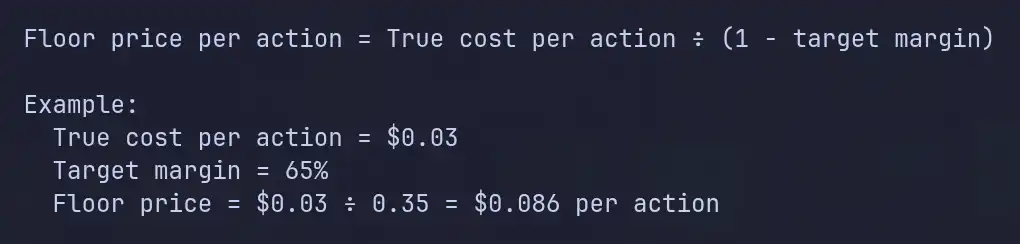
That number is your absolute minimum. Go lower, and every new customer drags you under.
Step 4: Set Your Market Price
Market price sits somewhere between three and ten times your floor, depending on how much value your AI delivers. The space between what it costs and what people pay is where you make money.
Let’s say your support AI resolves a ticket that would’ve cost $5 in labor, and you charge $0.99 per resolution. That’s a 5x value ratio. If your AI spits out sales proposals that would’ve eaten up $500 of a salesperson’s time, charging $10 to $50 each might still be a steal.
How to know if you nailed it? If people just pay, no questions asked, you’re probably too cheap. If they have to stop and do mental math before every click, you’re too expensive. The sweet spot is when customers use the AI naturally and feel the value.
Designing the pricing for a brand-new AI feature?
We build the cost model behind the price - true cost-per-action, target-margin math, and inference optimizations like model routing, prompt caching, and batching that can lift gross margin by 40% or more before you ever change a number.
Book a free scoping call and we’ll pressure-test your unit economics at 2x, 5x, and 10x usage, so your pricing still holds when customers lean in hard.
The Five Mistakes That Quietly Destroy AI Margins
We keep spotting the same missteps as SaaS teams bolt AI features into their products. All five are avoidable.
1. Bundling AI Into Existing Plans for Free
It’s tempting to think, “Let’s toss AI in - more value, less churn!” At first, it works. But soon, your most active users become your least profitable. Without limits, your top customers can cost you more in AI bills than they pay.
The fix: If you’re including AI, set usage caps. The limit itself says, “This is real value and it’s not free to provide.”
2. Pricing Based Only on the Competition
When Intercom launched Fin at $0.99 a pop, every support AI scrambled to match. The problem? Intercom’s costs and customers aren’t yours. Mirroring their price can leave your margins starving.
The fix: Use competitor pricing to understand the landscape. But set your floor price based on your costs, and figure out the top end from what customers value.
3. Ignoring Per-Customer Cost Differences
Average costs can look totally fine while a handful of customers bleed you dry. One big account with crazy-complicated multi-step queries might cost way more than what you charge them.
The fix: Track how much each customer costs from the start. Don’t tack on cost analysis later - you need it built in.
4. Not Planning for Usage Growth
People who get hooked on AI tools usually ramp up usage. Fast. If you don’t factor that in, you’ll cheer for growth but watch your profits shrink.
The fix: Run your numbers at 2x, 5x, and 10x today’s usage. If the model falls apart, add usage tiers or overage charges now.
5. Oversimplifying Pricing
Easy-to-understand pricing is great for your landing page. It’s a disaster if you apply that mindset to how you actually charge for AI. Behind the scenes, you need a system that tracks costs, margins, usage, and sends alerts if things go sideways.
The fix: Keep things simple on the page, but sophisticated in the backend. Show clean pricing tiers; meanwhile, your tech quietly tracks every AI call and its margin.
A Decision Framework: How to Choose Your AI Pricing Model
After working this out with many SaaS teams, it really boils down to three questions:
Question 1: Is AI the core product or an enhancement?
- Core: Go with usage- or outcome-based pricing.
- Enhancement: Tiered subscription with AI limits, or a hybrid.
Question 2: Can you clearly measure AI outcomes?
- Yes - use outcome pricing (like tickets resolved, docs processed).
- No - the AI just helps here and there - use credits or a hybrid.
Question 3: How variable is cost-per-user?
- Low: Tiered subscriptions work.
- High (some users run up big bills): You’ll need at least one usage-based component.
Most SaaS teams in 2026 land on hybrid pricing. It’s not the prettiest answer, but it works. You balance customer experience, protect your margins, and keep things manageable.
Key Takeaways
- Every AI feature comes with a real, variable cost. Ignore it, and margins slip away quietly.
- Hybrid pricing is the norm now. Most AI vendors blend base subscriptions with usage tiers to keep things predictable and safe for their bottom line.
- Start with your costs, not the market. Figure out what each AI action costs, build in a solid margin, and then check what others are charging.
- Don’t trust the average track how much each customer eats out of your margin.
- Plan on people using way more AI over time. Your pricing has to hold up at ten times today’s volume.
- Keep finding ways to shrink inference costs. Routing, caching, and batching can bump your gross margins by as much as 40%. Every tweak adds up as your AI offerings grow.
Pricing AI features isn’t a one-time decision - it’s a system you tune as your costs fall and usage climbs. Get the model right early, and AI becomes your most profitable feature instead of your most expensive one.
Building AI into your SaaS and stuck on pricing?
We’ve helped companies set up AI pricing that protects profit while driving adoption - from building the cost model, to implementing credit and metering systems, to the billing tech that quietly tracks every AI call and its margin in the background.
Book a free scoping call and we’ll map your pricing model, the metering you’ll need to run it, and a realistic build plan with budget and timeline.