

TL;DR: You don’t have to tear down your whole SaaS just to add AI features. In fact, the most solid integrations usually begin with one high-impact use case something your customers actually need, where you've already got good data, and the pain point is clear. This guide lays out the framework we've used ourselves for picking, prioritizing, building, and shipping AI features that people pay for and use.
The Pressure to Ship AI Is Intense But Cutting Corners Can Backfire
It feels like every SaaS roadmap for 2026 has “AI” written in big, bold letters somewhere. Competitors are launching AI features left and right. Customers want them. Investors expect them. It’s not just hype anymore if you don’t deliver, you risk losing users or falling behind.
But here’s the reality: teams that rush often get burned. They pick a flashy idea nobody actually wants, spend months lost in development, and end up with a demo that spits out nonsense or quietly fails. Sometimes they tack on an AI chatbot that says “I don’t know” to half the questions, and their users lose trust fast.
We made some of these mistakes ourselves when adding AI to our platform and to client products. What we share here isn’t theoretical. It’s what worked for us after plenty of trial and error, across everything from health tech to e-commerce. If you're shipping to real, paying customers, this framework matters.
Step 1: Find Real, High-Impact Use Cases (Skip the Demos)
The classic mistake? Starting with the tech. “Let’s add GPT!” Instead, you should zero in on concrete user problems. AI needs to solve something that slows your customers down right now.
Our Use Case Discovery Framework
We rank potential AI features by four main factors:
| Dimension | Question | Weight |
|---|---|---|
| User Pain | How much time or effort does this drain from the user? | 30% |
| Data Availability | Do we already own the data we need? | 25% |
| Failure Tolerance | How bad is it if the AI messes up? | 25% |
| Differentiation | Is this tough for competitors to copy? | 20% |
If the pain is high and you’re rich in data, but the cost of failure is huge (think medical advice), you need a different approach than for minor errors (like suggesting email subject lines).
The Five SaaS AI Patterns That Really Work
After plenty of launches and watching what succeeds we keep seeing the same categories deliver:
1. Intelligent Automation: AI replaces repetitive work that needs judgment. Stuff like auto-categorizing tickets, routing leads, extracting structured info from messy data.
2. Predictive Analytics: AI reveals trends and risks customers can’t spot themselves. Churn prediction, revenue forecasts, anomaly alerts in metrics.
3. Natural Language Interfaces: Users control complicated tools just by typing what they want. “Show me customers who signed up last quarter but skipped logging in this month” is way easier than wrangling filters.
4. Content Generation & Assistance: AI helps users create faster, smarter content. Drafting emails, writing reports, or picking responses.
5. Personalization & Recommendations: Product adapts in real-time to each user. Personalized dashboards, smart defaults, “suggested for you” options.
(Most of these patterns translate directly across verticals. If you want a deeper look at how the same categories play out in a specific industry, our breakdown of 15 AI use cases transforming ecommerce walks through real implementation costs and trade-offs per use case.)
Not sure which AI use case to start with?
We’ve helped SaaS teams across healthtech, fintech, and B2B tools cut through the hype and pick the one AI feature that will actually move retention, expansion, or activation numbers.
Book a free scoping call and we’ll score your top use cases against pain, data, and failure tolerance, and tell you which one to ship first.
Step 2: Build or Integrate? The Technical Architecture Question
Once you've nailed down the use case, here’s the crunch moment: should you build your own models or rely on third-party APIs?
When Should You Use APIs (OpenAI, Anthropic, AWS Bedrock, Google Vertex)?
Go with APIs if:
- Your use case needs general language skills or basic reasoning
- You don’t have millions of labeled, domain-specific examples
- You want something live in weeks, not months
- The AI job is generic (summarizing, extracting, classifying)
Honestly, most SaaS teams starting out should just call APIs. Don't overcomplicate things.
When Should You Build Your Own Models?
Build your own if:
- Your competitive edge comes from custom model quality
- You own lots of unique, labeled data think over 100,000 examples
- You need lightning-fast responses (sub-50ms) and external APIs are too slow
- Privacy or compliance stops you from sending data out
- Your feature needs AI to keep learning from user actions in ways APIs don’t support
Our Most Common Hybrid Approach
In real projects, we usually mix both: integrate APIs where it makes sense, but keep critical parts in-house. This way, you balance speed, quality, and control.
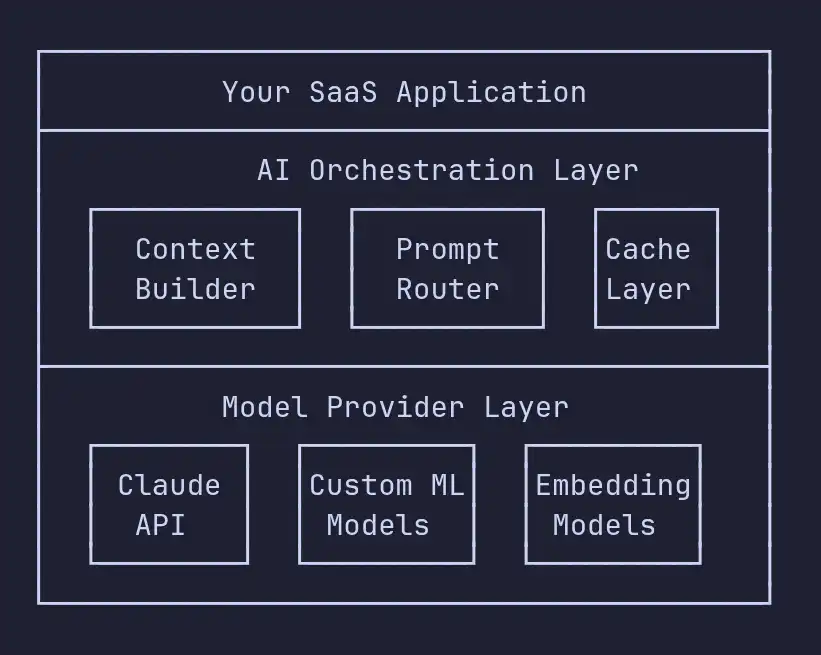
The AI orchestration layer is the middleman between your app and the model providers. It does a few important things:
- Context Building: It puts together all the info the AI needs like user data, product status, and any other context before sending a request.
- Prompt routing: It picks which model and prompt template fit the task at hand.
- Caching: For questions or requests that don’t change much, it stores responses so everything runs faster and cheaper.
- Fallback logic: If a model isn’t responding or is slow, it has backup plans so things keep working smoothly.
Here’s a quick look at how a simple orchestration layer actually works:
class AIOrchestrator:
    def __init__(self, config: AIConfig):
        self.providers = {
            "generation": AnthropicProvider(config.anthropic_key),
            "embedding": OpenAIProvider(config.openai_key),
            "classification": LocalModel("./models/ticket-classifier"),
        }
        self.cache = RedisCache(config.redis_url, ttl=3600)
        self.context_builder = ContextBuilder(config.db)

    async def execute(self, task: AITask, user_context: UserContext) -> AIResult:
        cache_key = self.cache.build_key(task, user_context)
        if cached := await self.cache.get(cache_key):
            return cached

        context = await self.context_builder.build(task, user_context)
        provider = self.providers[task.provider_type]

        result = await provider.execute(
            prompt=task.render_prompt(context),
            params=task.model_params,
        )

        if task.cacheable:
            await self.cache.set(cache_key, result)

        return result
This setup lets you swap out models say, trade Claude for GPT or even your own local model without messing with your core feature code. You also get to keep costs in check, since caching generally chops down API bills by 40-60% for most scenarios. And if something does go sideways, your system degrades gracefully instead of just breaking.
(The orchestration layer is also where your multi-tenancy boundaries get enforced. If you’re still firming up your core SaaS architecture, our complete guide to custom SaaS development covers the foundational decisions, tenant isolation, billing, infrastructure - that AI features need to plug into cleanly.)
Need help designing your AI orchestration layer?
Most SaaS teams either over-engineer this layer or skip it entirely and end up with prompts hard-coded across the codebase. Neither scales.
Book a free architecture review and we’ll sketch out an orchestration design tailored to your stack, plus a build-vs-buy recommendation for each component.
Step 3: Data Requirements - You Probably Have Enough
A lot of teams pause AI projects, worrying they need airtight, perfect data pipelines first. For training your own models, yeah, you do. But if you’re just integrating through an API? Not so much.
What You Actually Need
For most API-based features, here’s what matters:
- User context who’s using it, what they’re doing, a bit of their history.
- Domain knowledge you can fold into prompts stuff like product docs, category lists, those business rules you keep in a wiki.
- Feedback you can measure think thumbs-up or down, user edits, completion rates.
If you’re going custom later:
- Labeled training data (about 1,000+ samples for classification, or well over 10,000 for high-quality generation tasks)
- Clean, stable data pipelines with versioning baked in
- Evaluation sets with the “right” answers included
The Data Flywheel Pattern
For SaaS, building a data flywheel from day one pays off:
- Ship your first versions with API-based AI, using the data you already have.
- Instrument everything. Log what goes in, what comes out, and how users react.
- Collect subtle feedback did users take the suggestion, tweak it, or just ignore?
- Once you hit around 10,000 user interactions, you have the fuel to fine-tune a custom model. Your specialized system can outperform those broad API models.
- Later, ditch the API for your own tuned model cutting costs, sharpening performance, and reducing lag.
This is how we do it with clients: spin up AI features with APIs in weeks, then start piling up proprietary interaction data to build a strong competitive edge with your own model, over time.
Step 4: Privacy, Compliance, and Ethics
Don’t skip this. Especially not if you’re dealing with sensitive data, like in healthcare, finance, or anything involving personal info.
Data Privacy Framework
| Concern | How To Handle |
|---|---|
| User data sent to LLM providers | Strip out anything personally identifying before API calls. Only use providers with solid compliance (look for SOC 2 Type II) and formal processing agreements. |
| GDPR right to erasure | Make sure you can purge AI logs tied to any user. Never fine-tune with identifiable data unless the user absolutely agreed to it. |
| Model spitting out false “facts” (hallucinations) | Present AI outputs as suggestions, not THE answer. Show confidence indicators. Don’t auto-execute anything without user confirmation. |
| Bias in recommendations or scoring | Audit outputs across user groups, document what’s in your training data, and set up regular bias checks. |
Implementation Patterns for Compliance
With healthcare clients especially, we go with a privacy proxy pattern:
class PrivacyProxy:
    """Strips PII before AI processing, rehydrates after."""

    def __init__(self, pii_detector: PIIDetector):
        self.detector = pii_detector

    def sanitize(self, text: str) -> tuple[str, dict]:
        entities = self.detector.find_pii(text)
        sanitized = text
        replacements = {}

        for entity in entities:
            placeholder = f"[{entity.type}_{entity.id}]"
            sanitized = sanitized.replace(entity.value, placeholder)
            replacements[placeholder] = entity.value

        return sanitized, replacements

    def rehydrate(self, text: str, replacements: dict) -> str:
        for placeholder, value in replacements.items():
            text = text.replace(placeholder, value)
        return text
With this setup, you can take advantage of powerful LLM APIs without sending patient names, Social Security numbers, or other sensitive data outside your system.
Building AI features on top of sensitive customer data?
Healthcare, finance, and legal SaaS teams can’t afford to learn compliance the hard way. We’ve shipped HIPAA-aligned and SOC 2-ready AI features using privacy proxies, on-prem inference, and audit-friendly logging.
Book a free compliance scoping call and we’ll map what you can safely send to which providers, and what needs to stay in-house.
Step 5: UX Design - Getting People to Actually Trust Your AI
Building the model isn’t the toughest part. The real challenge? Designing an interface people actually trust and making sure they don’t trust it so much that they miss errors.
Principles We Stick To
1. Progressive Disclosure of AI Power
Don’t start with full automation. Begin by offering suggestions users must approve. From there, move to semi-automated actions, and only push for full automation where mistakes aren’t a big deal and are easy to fix.

Most features should start at Level 1. Let them earn their way to Level 2 after months of good results.
2. Show Your Work
When our AI puts a support ticket under “Billing,” we explain why: “Categorized as ‘Billing’ because the message says ‘invoice’ and ‘payment failed.’” That’s way more convincing than any percentage accuracy number.
3. Make Fixing Errors Easy
If the AI gets something wrong, fixing it should take one click and that feedback should go straight back into the system. Every user correction is a free lesson for your model.
4. Design for When the AI Flubs It
If your model’s right 80% of the time, that means 20% of users see mistakes. Build your UI for that 20% make it dead simple to dismiss, correct, or override what the AI suggests. And if failure is embarrassing or costly, add a human checkpoint.
(The same trust-building principles apply when you’re positioning AI features on your marketing pages. Our guide to SaaS landing page optimization digs into how social proof, transparency, and CTA design move AI features from “suspicious” to “must-have” in a visitor’s mind.)
Step 6: How to Actually Build This, With a Realistic Team
Minimum Team, Maximum Progress
Forget the massive ML team. To launch your first AI feature, you really just need:
| Role | What They Own | Who It Can Be |
|---|---|---|
| Product Owner | Sets the use case, success metric, UX requirements | Your current PM |
| AI Engineer | Handles the orchestration layer, prompt creation, API work | A senior backend dev who’s interested in AI |
| Data Engineer | Builds data pipelines, logging, evaluation tools | Someone on your existing data team |
| Frontend Dev | Delivers AI UX, collects feedback | Someone on your frontend team |
Basically, your existing folks can take on AI work to get started no need for a dedicated ML department yet. Once you’re building deeper models or more features, sure, add actual ML engineers and data scientists.
The Development Process That Works
- Set a quantitative success metric
- Build a test dataset (50–100 clear, correct examples)
- Prototype using quick prompt engineering (not weeks days)
- Test on your dataset, tweak until you hit 80%+ accuracy
- Release to 5% of users and monitor carefully
- Track real-world accuracy and user feedback
- Tweak prompts/context/models as you see results
- Roll out more broadly: 5% → 25% → 50% → 100%
- Keep monitoring and improving
The step almost everyone skips? Step 2: building that evaluation dataset. If you don’t do it, you’re just tinkering in the dark, with no clue whether your changes actually help.
Step 7: Common Pitfalls (We've Hit Most of These)
1. “AI-Powered Everything” Trap
Don’t slap “AI” on features that already work perfectly with if/then logic. If your rules get you 95% there, extra ML probably just wastes time and money.
2. Ignoring Latency
People expect instant results, but LLMs can take 1–5 seconds to answer. If your app grinds to a halt waiting on the AI, users get frustrated fast. Use streaming, optimistic UI, or background jobs with notifications. Plan for this from day one.
3. No Graceful Fallbacks
APIs go down. Models glitch. Don’t let your product crash because the AI is out of commission. Fall back on plain old logic, allow queued retries, or at least show a clear “AI currently unavailable” message.
4. Underestimating Prompt Engineering
Getting a general AI model to behave in your domain takes trial and error. Block off 2–3 weeks to fine-tune prompts for each feature. The first prompt works about 60% of the time; getting to production-ready usually means running through 30+ iterations.
5. Skipping Cost Calculations
An AI feature that costs $0.50 per user each month might work at $50/month pricing, but at $10/month it destroys your profits. Figure out your per-user API costs before you build. Structure your system for caching and batching based on those numbers. (Unmodeled AI cost is one of the silent margin killers we cover in The SaaS Revenue Leak Audit - worth a read before you price your next AI tier.)
Ready to ship your first AI feature without the common pitfalls?
We’ve hit most of these traps so you don’t have to - from latency disasters to runaway API bills to AI features nobody used. We bring that scar tissue to every engagement.
Book a free scoping call and we’ll outline a 6-8 week plan to ship your first production-grade AI feature, with realistic costs and clear success metrics.
Scaling and Cost-Saving Tips
Scaling up means API costs can balloon, but there are ways to rein them in:
- Semantic caching: Don’t just cache identical requests cache similar ones, too. This can cut costs by 30–50% when you have lots of repetitive questions.
- Model tiering: Use small, cheap models for the routine stuff; save big, expensive models for complex cases.
- Batch processing: For stuff that’s not instant (like weekly reports), batch jobs during low-traffic hours for cheaper rates.
- Progressive model replacement: Once you’ve got enough data, train a smaller open-source model on your infrastructure for routine high-volume tasks. Running your own model is way cheaper than paying for every API call.
Key Takeaways
-
Start with the user problem, not shiny tech. The best AI features solve a pain point you already have data on and where perfect accuracy isn’t critical.
-
Ship fast with APIs, then build your moat with data. Use off-the-shelf models to begin, then collect usage data to train your own, better models over time.
-
Design for when it breaks. Every AI feature will be wrong sometimes. Trust depends on how easy it is to fix, how transparent the system is, and whether it fails gracefully, not just how accurate you are on paper.
-
Your orchestration layer is where you win. The models are all out there. The real edge lies in how you build context, engineer prompts, handle caching, and create feedback loops tuned to your particular domain.
-
Know your cost math early; scale with intention. AI’s costs rise with use. Get caching, model selection, and batching right from the start.
What We’d Do Differently
If we could start over:
- We’d build the evaluation framework and feedback collection tools before writing any prompts. If you’re not measuring, you’re just guessing.
- We’d launch AI features at 70% accuracy with a clear “beta” label, instead of waiting for near-perfection. Real users tolerate more than you’d think, and their feedback beats months of internal polish.
- We’d lay down a standard orchestration architecture from day one, rather than custom-building connections for every new feature.
We work with SaaS companies integrating AI capabilities into their existing products - from identifying the right use cases to shipping production-ready features. If you're planning your AI roadmap and want a second opinion on prioritization or architecture, we'd enjoy comparing notes.