
TL;DR: Here’s the reality: over half of enterprises now have AI agents running live in production (not just fancy demos), and the market’s shooting to almost $11 billion this year. But still, nearly nine out of ten agent projects never make it out of the workshop. We wrote this guide for teams serious about shipping - it covers the real architecture patterns, proven frameworks, nitty-gritty implementation steps, and the hard lessons that separate teams with working agents from those stuck at the proof-of-concept stage. We’ll look at how to pick the right orchestration pattern, keep tenants isolated, and avoid common cost traps, sharing code samples, pricing data, and real-life production numbers along the way.
Most SaaS founders, honestly, hear “AI agents” and picture a magic button: something that fields support tickets on its own, writes proposals, automates workflows, all unsupervised. That’s not what you actually get in 2026.
Production agents are more like a sharp but junior employee. They follow the process, use only the tools you approve, ask for help if they’re confused, and get better with coaching. They’re still impressive - Klarna’s agent, for example, handled 2.5 million customer chats, doing the work of 700 full-timers - but you need boundaries or things go sideways fast.
We’ve spent a year building agent systems into our platform (Conception). Turns out, the gap between a slick demo and a real, production-ready system is a lot bigger than most people expect. The bright side? The tools are a lot better, the patterns are proven, and the math finally works for most SaaS teams.
We put together the guide we wish we’d had at the start. It picks up at the point when you’ve moved past prototypes and need to make agent systems reliable and cost-effective - especially as the bills come due around month three.
(If you’re still earlier in your AI journey - shipping your first AI feature rather than a full agent system - start with our guide on how to add AI features to your existing SaaS product. It covers the prerequisite work this post assumes you’ve already done.)
The State of AI Agents in SaaS
Let’s talk numbers before we jump into architecture.
The global market for AI agents is on track to hit almost $11 billion by 2026, and explode to more than $52 billion by 2030. That’s driven by a ridiculous 46% annual growth rate. Even more eye-opening: Gartner says that by the end of 2026, 40% of enterprise apps will feature some flavor of task-specific AI agent - up from less than 5% just a year earlier.
This isn’t another “future of work” hype cycle - it’s already happening.
Here’s what we’re seeing:
- 51% of enterprises are running AI agents in production; another 23% are rolling them out fast.
- Deloitte thinks that half of organizations will pour more than half of their digital transformation budget into AI automation this year.
- Agentic AI gives an average return on investment of 171% (around three times what you get from plain old automation), and in the U.S., it’s nearly 200%.
- Payback happens fast: just over four months for customer service agents, a little under seven for marketing ops, and about nine for engineering tools.
Here’s the part nobody brags about: 88% of AI agent projects stall out before they ever ship. Gartner says over 40% of agentic AI projects will get cancelled by 2027. The real minefield is that gap between launching a project and actually shipping something real.
The folks who succeed have a few things in common: they pick a narrow, crystal-clear use case to start. They build the foundations for testing and monitoring before they obsess over adding features. And they treat their agents like products to be built, shipped, and maintained, not just quick add-ons.
What AI Agents Actually Are (And When You Shouldn't Build One)
Let’s get straight about the terms, because most teams don’t.
A chatbot just talks. Takes input, spits out a response, that’s it - like a slightly smarter form.
An AI agent actually does stuff. You give it a goal, and it figures out how to get there: plans, chooses tools, calls APIs, updates records, double-checks what happened, then loops back until it’s done.
An agentic workflow chains a bunch of agents (or agent steps) to handle bigger tasks - things like processing refunds, onboarding new customers, or crunching data to make a financial report.
This distinction matters because we've seen teams build agent infrastructure for problems that a well-designed prompt and a single API call would solve. The rule we follow internally:
- If it’s just one step with a clean output, stick with a single prompt.
- If it needs two or three tool calls with no surprises, use tool-calling in your LLM.
- But if you need branching logic, decisions mid-process, or the ability to tweak plans based on what just happened - build an agent.
Just because something repeats doesn’t mean it needs an LLM agent. Most failures in production lately aren’t about model quality, they’re because teams bring a bulldozer to do what a shovel can handle.
Not sure if you actually need an agent, or just a smart prompt?
We’ve helped SaaS teams avoid six-figure engineering bets on agent systems they didn’t need - and we’ve helped others ship agents that paid for themselves in a quarter.
Book a free scoping call and we’ll map your use case to the right pattern - single prompt, tool-calling, or full agent - with a realistic budget and timeline.
Agent Architecture Patterns That Actually Work
Five agent design patterns have actually made it through the hype and proven themselves in production. Picking the right one early will save you months, not just headaches.
1. ReAct (Reasoning + Acting)
This is the classic pattern. The agent bounces back and forth between thinking through a step (“Alright, I need to check the user’s subscription status”), doing something (like calling the subscriptions API), and then taking in the result. This loop keeps going for as long as needed.
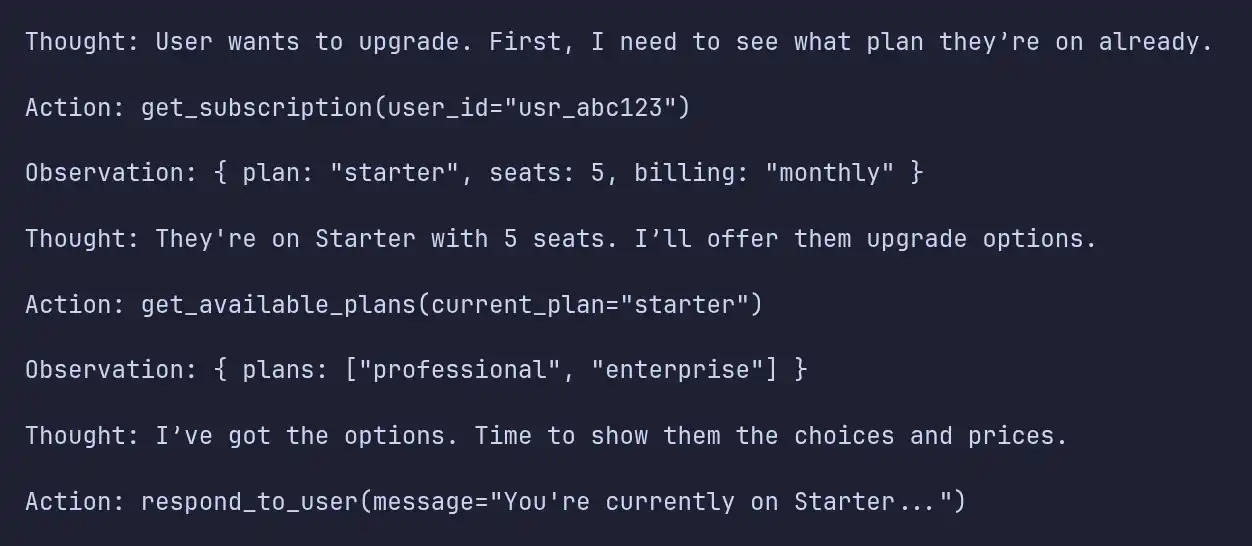
When to use it: This works for almost any single-agent job: customer support, fetching data, handling simple workflows. Honestly, if you’re not sure where to start, use this.
Trade-off: It only moves one step at a time, waiting on each result before going further. If the task is long say 10 steps or more these little delays add up.
2. Plan-and-Execute
You split up the big picture and the grunt work. A powerful model thinks through the whole plan, smaller models handle the steps, and a “re-planner” checks in and tweaks the plan during execution.
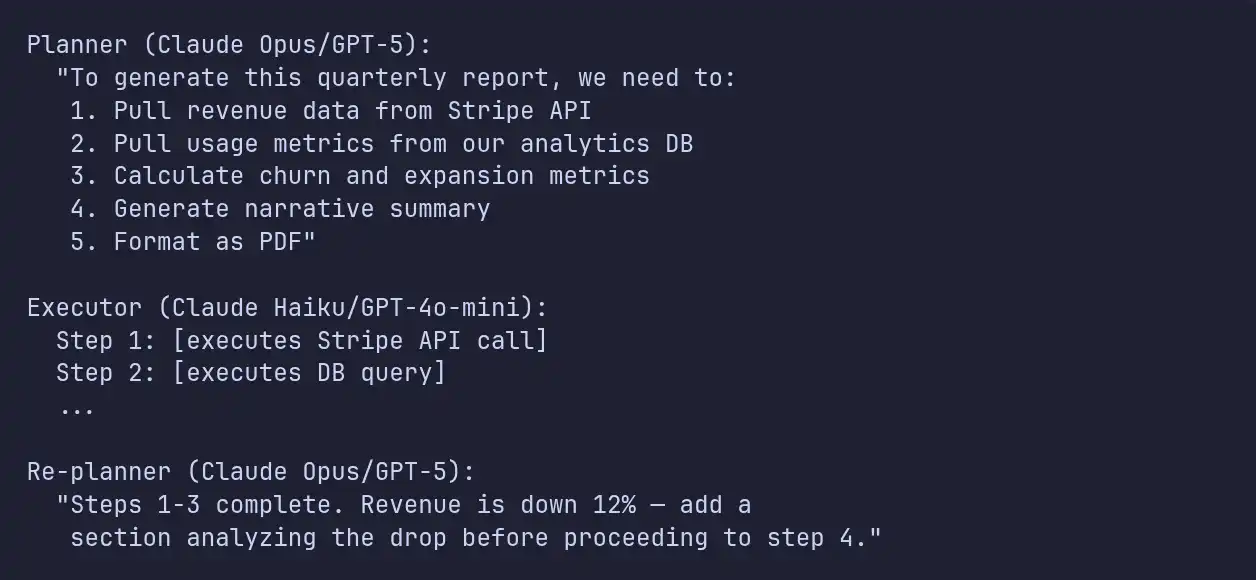
Benchmarks show this method completes 92% of tasks and runs 3.6 times faster than running everything one step at a time with ReAct, especially when the task gets complex. The main trick: smart models do the thinking, cheaper ones do the doing.
When to use it: Any big task that needs five or more steps, combines data from a bunch of places, or needs to adjust as it goes (like report generation or complex workflows).
3. Orchestrator + Isolated Subagents
This is the design that basically everyone shipping multi-agent products has landed on. Five big players Anthropic, OpenAI, AutoGen, Cognition, LangChain they all use this approach now, even though they came to it on their own.
Here’s how it works: You’ve got an orchestrator agent that keeps the full picture, and it spawns temporary subagents for each job. Each subagent gets its own prompt, context, and tools. Once it’s done, it summarizes what it did and hands it back to the orchestrator.
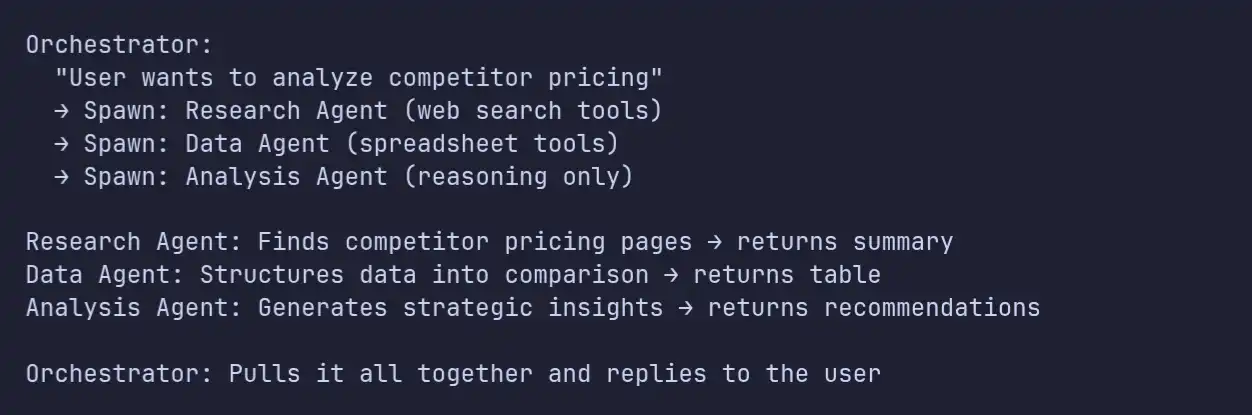
Three proven rules from real-world use:
- Each subagent gets its own prompt never reuse the orchestrator’s.
- The user’s first message should be a clear, structured brief: objective, preferred format, allowed tools, limits.
- Each subagent only sees what it needs (no context sprawl).
When to use it: Whenever you need multiple specialties, to work across different domains, or want agents to run at the same time (parallel execution).
4. Reflection
This one’s pretty simple the agent checks its own work before sending it out. It’s like having an internal reviewer for code, content, or any output where quality is a must.
When to use it: Content or code generation, or any time quality beats speed.
5. Tool Use
This is the basic version just pick a tool and use it. Most SaaS “AI features” use this underneath: no agents, just a model choosing and executing the right tool on demand.
When to use it: Anytime you need outside data or actions, but the choice is straightforward.
The Pattern We Recommend Starting With
Go with Orchestrator-Worker. It’s the easiest to debug one clear control flow and you can scale by adding more workers. Most teams that experiment with peer-to-peer multi-agent setups end up switching to orchestrator-worker anyway, once the debugging gets out of hand.
Choosing Your Framework: The 2026 Landscape
Picking the right framework in 2026 feels a lot simpler than it used to be. The landscape has really settled down, and, honestly, it comes down to what tech stack you’re working in and where you’re heading prototype or production.
If your team’s using Python, LangGraph pretty much owns the space now. It handles both Python and TypeScript, and its graph-based approach makes audit trails and rollbacks straightforward. The enterprise emissions don’t lie: companies like Klarna, Uber, LinkedIn, JPMorgan, Cisco, and BlackRock all have LangGraph running live and about 400 other big teams. If you care about observability, LangSmith just plugs right in.
Now for folks who are serious about type safety: Pydantic AI is your go-to. It treats LLM calls like typed function calls with schema checks smooth if you’re already using FastAPI (which, let’s be real, most Python teams are). Over 16,500 GitHub stars speak for themselves. Pydantic AI works across all major models, so you’re not locking yourself into anything weird.
CrewAI’s great if you’re cobbling together a quick multi-agent prototype but everyone knows the drill. You start with CrewAI, and as you inch towards production, you jump to LangGraph. If you know you’re aiming for something more robust out of the gate, skip the hassle and choose LangGraph.
Over on the TypeScript side, LangGraph holds its top spot, just as it does in Python. Same strengths, same heavy hitters in production. If your team loves a clean, all-in-one solution, Mastra is solid. It’s from the Gatsby creators and has a crazy following: 22,000 GitHub stars, 300,000 weekly npm installs. It gives you six basic building blocks agents, workflows, tools, memory, RAG, evals. If Next.js is your world, Mastra fits right in. Plus, it covers 3,300+ models from 94 providers.
If you’re already on Vercel’s platform, their AI SDK version 6 just made Agents real. You can sequence tools, set stop conditions, get structured outputs through Zod, and trace everything with OpenTelemetry. Full MCP support. Basically, if you’re deep in Vercel, stick with their SDK it’ll save a ton of headaches.
For teams tied to specific ecosystems
say, Claude, OpenAI, or Google their agent SDKs are tailored for deep integration. Anthropic’s Claude Agent SDK gives you everything powering Claude Code: agent loops, context management, tools for web and filesystem access. It keeps context clean and compact, which is perfect if you’re building heavily around Claude models.
OpenAI’s Agent SDK is all about passing control between agents. You get handoffs, guardrails, and tracing simple primitives, but you’re locked into OpenAI models.
Google’s ADK is open source, runs in Python, Go, Java, TypeScript, and it supports multi-agent setups natively. If you’re on Google Cloud and using Gemini, it’s a natural fit.
Our Production Stack
When we build production agent systems for clients, here’s the stack we default to:
| Layer | Choice | Why |
|---|---|---|
| Agent framework | LangGraph (Python) or Mastra (TypeScript) | Graph-based orchestration, model-agnostic |
| Primary model | Claude Opus 4.6 (planning) + Claude Haiku 4.5 (execution) | Best reasoning for planning, cost-effective execution |
| Vector database | pgvector (if Postgres exists) or Qdrant (dedicated) | pgvector avoids a new dependency; Qdrant is 10-25% faster |
| Memory | Mem0 (consumer apps) or Letta (autonomous agents) | Mem0 for "remember the user"; Letta for long-horizon coherence |
| Tool connectivity | MCP (Model Context Protocol) | 9,400+ public servers, vendor-neutral standard |
| Observability | LangSmith or Braintrust | LangSmith for LangChain ecosystem; Braintrust for CI/CD-native evals |
| Evaluation | Braintrust + custom domain-specific evals | Production failures become eval cases automatically |
Picking a framework you’ll still want to use in 18 months?
The wrong framework choice in month one becomes a six-month rewrite in month nine. We’ve shipped agent systems on LangGraph, Mastra, Pydantic AI, and the major vendor SDKs, and we know where each one breaks at scale.
Book a free architecture review and we’ll recommend the right stack for your team’s skills, your existing infrastructure, and your three-year roadmap.
Technical Implementation: The Details That Matter
This section covers the implementation details that separate a working demo from a production system.
Let’s talk tools and MCP
These are the details that make the difference between a demo and something that’ll survive in production.
Being able to call tools (meaning: agents pick and run functions) is what makes agents actually useful. By 2026, MCP Model Context Protocol rules the road. Connecting agents to tools and data sources? MCP is the standard.
Just look at the numbers: 97 million SDK downloads every month, 9,400 public MCP servers (a huge leap from just 1,200 a year ago), and three-quarters of enterprise AI teams are running at least one MCP-backed agent live.
MCP moved to the Agentic AI Foundation under the Linux Foundation in December 2025. Everyone’s onboard OpenAI, Google, Microsoft, AWS, and basically every major platform supports MCP now.
Here’s a glimpse at what an MCP tool definition looks like:
// Define a tool that queries your SaaS product's database
const subscriptionTool = {
  name: "get_subscription",
  description: "Retrieve a customer's current subscription details",
  inputSchema: {
    type: "object",
    properties: {
      customer_id: {
        type: "string",
        description: "The customer's unique identifier"
      }
    },
    required: ["customer_id"]
  },
  handler: async ({ customer_id }) => {
    // Enforce tenant isolation at the tool level
    const subscription = await db.subscriptions.findOne({
      where: { customerId: customer_id, tenantId: context.tenantId }
    });

    if (!subscription) {
      return { error: "No subscription found for this customer" };
    }

    // Return only the fields the agent needs - minimize context pollution
    return {
      plan: subscription.planName,
      status: subscription.status,
      seats: subscription.seatCount,
      renewalDate: subscription.renewalDate,
      mrr: subscription.monthlyRecurringRevenue
    };
  }
};
Here are three tool-calling failures we’ve run into in production:
-
OAuth struggles. Tools that connect to external APIs need to handle token refreshes smoothly. If your Slack token expires right in the middle of a conversation, the agent shouldn’t just make something up. It needs to fail cleanly and let you know.
-
Rate limits trip everything up. Say the agent fires off 15 API calls in a 10-step workflow, but at step 8, a 429 error pops up. The retry logic has to live at the tool level with exponential backoff. The agent itself shouldn’t worry about rate limits - just whether a call worked or didn’t.
-
SOC 2 audit logging isn’t optional. Every single tool call has to be logged: full parameters, timestamp, latency, and response. If a customer asks, “Why did your AI cancel my subscription?” you need the whole trace right there. For enterprise SaaS, that’s just table stakes for compliance.
Memory and State Management
Memory isn’t something you tack on at the end anymore. It’s now a core piece of the architecture. Honestly, most of the “model isn’t smart enough” complaints are actually about bad memory and context handling.
When you look at production traces, agent contexts blow up to 80,000-120,000 tokens in just a couple weeks. Weirdly, it’s not context exhaustion that takes most systems down, it’s context drift or memory loss. In 2025, 65% of enterprise AI failures happened because the model couldn’t find the right information, not because it ran out of room for tokens.
We use a three-tier memory architecture:
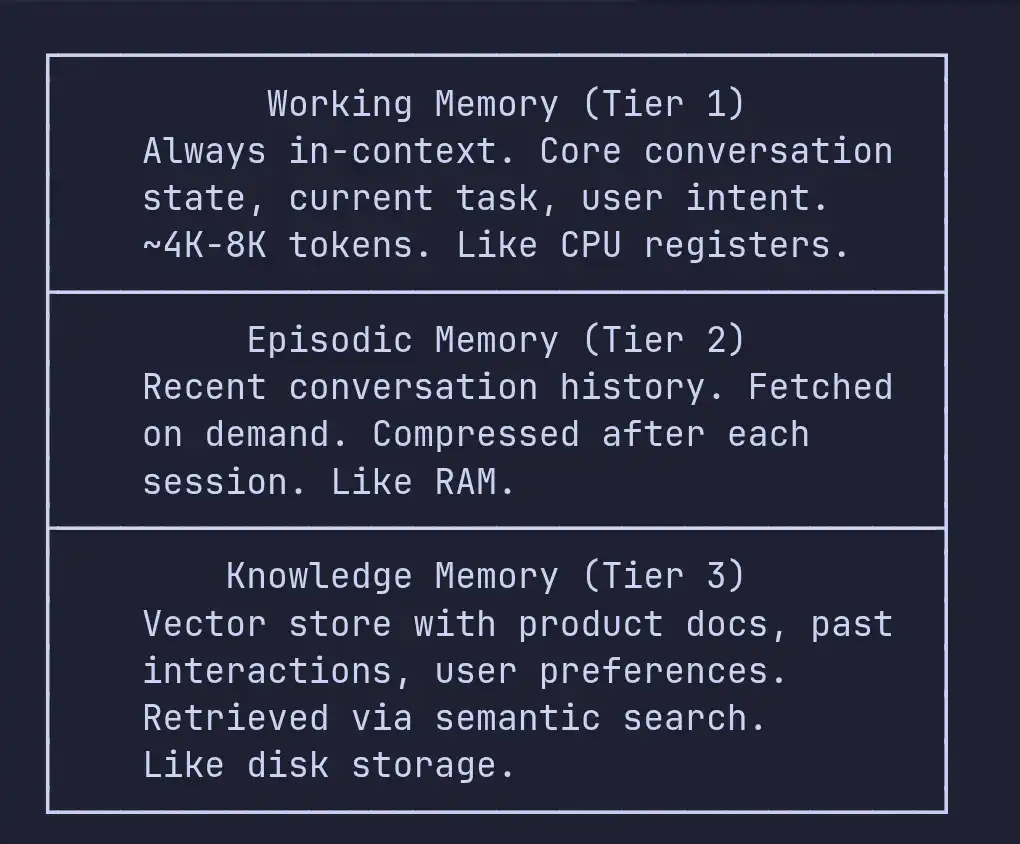
Working memory sticks around in the agent’s context window you’ve got the user’s latest message, the active task, and important details about the user like their plan and permissions, plus their name. Make sure this stays under 8K tokens.
Episodic memory is basically the conversation history, but it gets compressed after every session. Anthropic’s compaction API cuts down the token count by 80-90% without losing what matters. We run this at the end of each session and save the compressed history.
Knowledge memory is your retrieval layer it pulls in product docs, previous support tickets, and user activity logs. Agents using retrieval-augmented generation (RAG) hit 86% accuracy on domain-specific stuff, compared to 58% with plain models. One bank’s chatbot went from 25% to 89% just by rolling out RAG strategically.
Here’s a critical move: grab Tier 3 knowledge before the agent starts reasoning. If you pre-load the context into the system prompt, the agent runs faster and won’t skip or “forget” checking the knowledge base.
Multi-Tenancy: The Headache Nobody Warns You About
If you’re plugging agents into a multi-tenant SaaS platform, tenant isolation has to be your top security worry. Cross-session data leaks when info from one customer slips into another’s session thanks to sloppy caching, shared memory, or bad context handling are just about the worst thing that can happen.
System prompt leakage was still popping up as a major exploitable flaw in every LLM model as late as March 2026.
Here are the data leak paths we’ve spotted and fixed:
-
Prompt-based leaks: If tenant-specific info creeps into the system prompt, someone can get the model to spill it. Fix: keep tenant data in tool responses, not the system prompt.
-
Tool-based leaks: If your database queries skip filtering by tenant ID, agents pull records from the wrong tenant. Fix: enforce isolation at the tool level every query needs
WHERE tenant_id = ?. -
Memory leaks: Shared memory like one Mem0 instance or a common vector store can surface one tenant’s data for another. Fix: namespace memory using tenant IDs, and keep vector collections separate or strictly filter metadata.
-
Logging/telemetry leaks: If your logging grabs full agent traces with user data and someone with access sees traces across tenants, you’ve got a problem. Fix: redaction for PII in logs and strict role-based access to traces.
# Every tool must enforce tenant isolation
class TenantScopedTool:
    def __init__(self, tenant_id: str):
        self.tenant_id = tenant_id

    async def execute(self, query: str):
        # Tenant ID is injected at initialization,
        # not passed by the agent (which could hallucinate it)
        results = await self.db.execute(
            "SELECT * FROM tickets WHERE tenant_id = $1 AND status = $2",
            self.tenant_id,
            query
        )
        return self._redact_pii(results)

    def _redact_pii(self, results):
        # Strip fields the agent doesn't need
        # Less data in context = less leak surface
        return [{
            "id": r.id,
            "subject": r.subject,
            "status": r.status,
            "created": r.created_at
        } for r in results]
The big takeaway here: if you care about tenant isolation, enforce it at the infrastructure level not just in your prompts. Telling the model “only access data for tenant X” isn’t a real security measure. It’s more like advice the model can ignore.
(If your SaaS foundation isn’t built for clean tenant isolation in the first place, agents will magnify every weak point. Our complete guide to custom SaaS development covers the multi-tenancy, billing, and infrastructure decisions agent systems need to plug into.)
Bolting agents onto a multi-tenant SaaS without leaking customer data?
Cross-tenant data leaks are the single fastest way to lose enterprise contracts - and most teams discover the gaps after their first SOC 2 audit, not before.
Book a free security scoping call and we’ll review your tenant isolation, tool design, and memory architecture before they become a compliance problem.
Context Management: The Sneaky Source of Cost
Bad context management is responsible for 60-70% of all agent costs when you’re running in production. Most teams don’t realize that until the third month’s API bill rolls in, and by then, the damage is done.
It creeps up on you. Every tool call, every message, every bit of retrieved info adds tokens. If you’re running a support agent handling 50 conversations a day, you can at least see where costs are coming from. But a power user digging into analytics can burn through 100 times the inference budget of a normal user in a single session.
Here are five things we’ve done to cut context costs by over 60%:
-
Chop down context aggressively: After a tool call, don’t keep the whole API response trim it to only the fields the agent actually needs. An API response could be 2,000 tokens, but the important part is usually less than 200.
-
Use anchored iterative summarization: Every 10 turns, pause and summarize the conversation so far. Replace the full history with this summary, but keep the original user question and the last 3 turns. The agent needs to remember where things started and what just happened.
-
Take advantage of provider-native compaction: Tools like Anthropic’s compaction API cut token usage by 80-90% with minimal loss in useful context. Run it between sessions.
-
Route requests smartly: Save the expensive models (like Claude Opus or GPT-5) for planning and tricky reasoning. Push execution and straight forward steps to smaller, cheaper models (like Claude Haiku or GPT-4o-mini). By shifting 70% of your traffic to less pricey models, costs drop by about 60%.
-
Cache your prompts: Both Anthropic and OpenAI offer prompt caching. This slashes costs by 45-80% and speeds up response times by 13-31%. Cache your system prompts and tool definitions that get used a lot.
Real-World Use Cases: What’s Actually Working
Let’s get concrete. Here’s how some big SaaS companies are really using production AI agents and what the numbers look like.
Customer Support Agents
This is where the tech is most proven, and the ROI speaks for itself.
Klarna’s AI agent handles two-thirds of all customer support - 2.5 million conversations that cover what would otherwise require 700 full-time employees. Resolution time dropped from 11 to 2 minutes. That delivered a $40 million profit improvement. Klarna built this with LangGraph and LangSmith.
But the story isn’t all smooth. In 2026, Klarna ended up rehiring human agents after customers complained about agent quality on complicated issues. The takeaway? AI support is great for the basics, but you still need humans for the tricky stuff. Draw clear lines on what gets escalated.
Intercom Fin does support for $0.99 per resolved conversation. Lightspeed Commerce sees 72% of issues resolved automatically, with Fin involved in 99% of conversations. Intercom is now making nine-figure revenue from Fin. This shows AI agent monetization isn’t just hype.
Rocket Money gets $1 million in annual ROI with a 68% resolution rate.
ZayZoon saves millions with an 80% resolution rate.
The cost difference is nuts: $0.46 per AI-resolved ticket versus $4.18 per human so you get nine times the savings.
Sales and Revenue Agents
Salesforce’s Agentforce hit $800 million in annual recurring revenue by the end of fiscal 2026. They use three pricing models: pay-per-conversation for support scenarios, Flex Credits for pay-per-action, and per-user licensing for teams who want predictable spend.
Sales teams using AI agents now close deals 4x faster. The agent qualifies leads, books meetings, follows up, and updates CRM freeing up actual salespeople to do what matters most.
Developer Productivity Agents
Uber built an agent network (with LangGraph) to auto-generate unit tests. This results in thousands of code fixes daily, expands platform coverage by 10%, and saves about 21,000 developer hours.
The math here is hard to ignore: $0.72 per AI code review, versus $48 per review from a senior engineer 66 times cheaper. This doesn’t replace humans it lets senior engineers review AI draft reviews instead of doing everything from scratch.
Product Feature Agents
Notion launched Custom Agents in February 2026, with integrations for Linear, Figma, HubSpot, Stripe, GitHub, and Intercom. They charge $10 per 1,000 credits as an add-on. This is probably the pattern most SaaS products will follow: agents as premium features with usage-based pricing.
The ROI Timeline
Pulling together industry data and our own numbers:
| Metric | Year 1 | Year 2 | Year 3 |
|---|---|---|---|
| Average ROI | 41% | 87% | 124%+ |
| Knowledge worker time recovered | 6.4 hours/week per seat | - | - |
| Median payback (customer service) | 4.1 months | - | - |
| Median payback (marketing ops) | 6.7 months | - | - |
| Median payback (engineering) | 9.3 months | - | - |
Initial development only accounts for 25-35% of your three-year spend. Keep in mind, ongoing ops will add another 20-40% annually on top of that build cost.
The Compound Accuracy Problem: Why Most Agent Projects Fail
Let’s talk about why so many agent projects fall apart once you get past the prototype phase. Honestly, this is the toughest problem in deploying automated workflows, and it trips up almost every team at some point.
Think about it. If your agent nails each step with 85% accuracy, a workflow with 10 steps only gets everything right 20% of the time because every error compounds. Push your accuracy up to 95% per step, and you still only succeed entirely 60% of the time.
Demos feel smooth because you’re usually seeing a three-step process. In the real world, those workflows stretch to 10 or 12 steps, with messy data, weird user requests, and edge cases nobody predicted.
So, what do you do about this? Five main moves:
-
Cut steps wherever you can. The fewer steps, the fewer things that can go wrong. Combine actions and use structured outputs to squeeze more results out of a single tool call.
-
Checkpoint and validate along the way. Don’t just glide through the workflow and hope for the best. After every key step, make sure the output still makes sense. If something’s off at step three, catch it there don’t let the mistake snowball through the rest of the process.
-
Bring in humans for the big moments. For anything sensitive or high-stakes (canceling subscriptions, refunds, billing changes), ask for human approval. People don’t actually mind being asked to confirm better that than unwelcome surprises.
-
Use deterministic code for the simple stuff. Don’t run everything through the language model. If you can handle validations, formatting, or lookups with regular code, do it. Cutting probability from the chain makes everything sturdier.
-
Track each step’s accuracy. Don’t just look at the overall success rate break it down. If step four has way more errors than the others, put your energy there.
Guardrails, Saftey and Reliability
Now, when it comes to reliability and safety, most organizations simply aren’t ready. Deloitte says only 20% have mature AI governance. And with the EU AI Act’s high-risk requirements coming soon, companies selling in Europe basically have no choice but to take this seriously.
Input Guardrails
Check every input on your sensitive paths. That means:
- Prompt injection detection. This is the top LLM risk. Watch out for direct injection (users trying to override instructions) and indirect injection (sneaky code buried in linked content).
- PII checks and redaction. Always scan for personal info you don’t need before sending anything to the model.
- Intent classification. Route requests to the agent or person best equipped to handle them. You don’t want a billing question landing with tech support, or vice versa.
Output Guardrails
Don’t let your system hallucinate important details or leak data. Always:
- Check factual claims. If your agent spits out numbers, statuses, or dates, make sure they match your actual data.
- Confirm big actions. Before making changes like sending emails, processing payments, or updating records get confirmation from the user.
- Filter responses. Every message should match your brand standards and any relevant regulations.
The 12-Guardrail Framework
Research backs this up: a tough guardrail setup can drop hallucination risks by 70% or more. Focus on these layers:
- Clear rules in your system prompt
- Strong input validation
- Ground facts with RAG (retrieval-augmented generation)
- Limit each tool’s access to just what it needs
- Verify output against real data
- Get human sign-off on critical steps
- Set rate limits per user or tenant
- Log everything, always
- Run automated checks on real production activity
- Regularly do adversarial and red-team testing
- Give uncertain cases a clear way to escalate
- Include a kill switch for emergencies
Cost Management and Optimization
For live production, expect to spend somewhere between $3,200 and $13,000 a month, depending on how many users you have, which language models you use, and how smart you are with optimizations.
LLM calls soak up the vast majority of this cost usually 70-85%. Most teams are overpaying by nearly double because they stick with the fanciest model for every task without thinking.
Model Routing: Your Number One Cost Saver
Here’s what makes the biggest difference: route every task to the models best suited for it, not just the default. This step alone does more to rein in your budget than anything else.
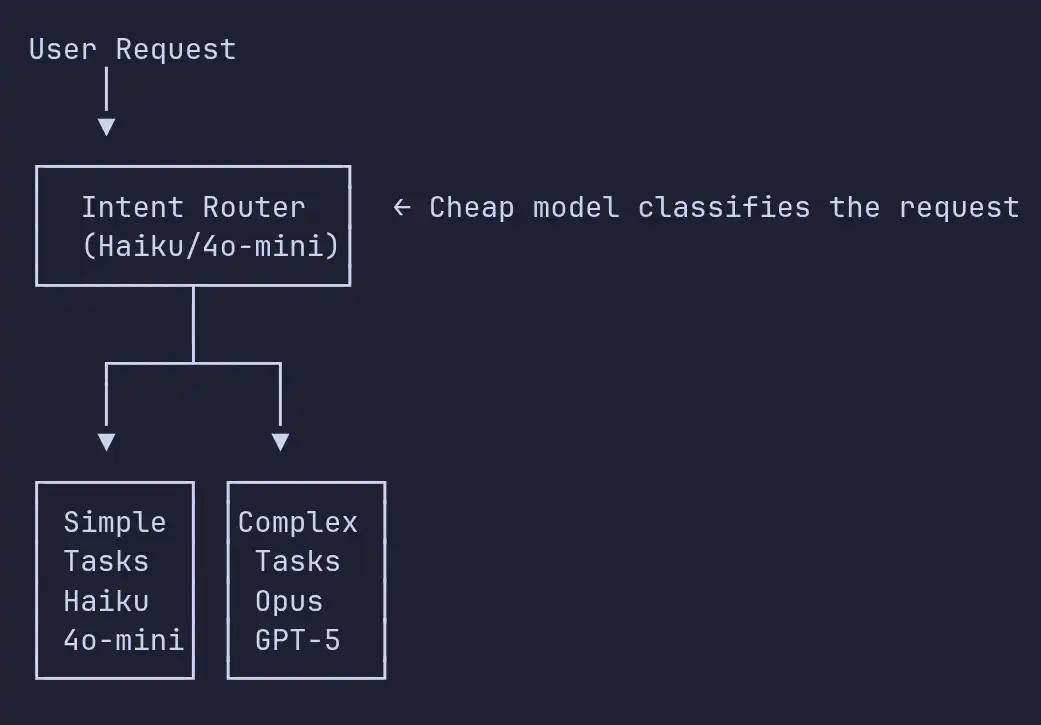
Send 70% of requests to the smaller models just keep the complicated stuff for the expensive frontier models. Doing this slashes your costs by around 60%.
Here are five ways to cut your token spending anywhere from 47% to 80%:
- Cache your prompts and tool definitions. When users hit the same prompts over and over, caching can cut costs by up to 80%.
- Prune your context. Don’t dump giant API responses into your models just keep what’s essential. That 2,000-token monster can shrink to 200 tokens of actual useful info.
- Route requests smartly. Simple tasks? Cheap models. Tough tasks? Frontier models.
- Batch your processing. If you don’t care about speed like when generating reports send the requests in bulk and get batch discounts.
- Compact conversation history. Instead of dragging every raw token forward between sessions, compress it. Way more efficient.
Here’s what those costs really look like:
| Use Case | Monthly Cost Range | Primary Cost Driver |
|---|---|---|
| Customer support agent | $3,200-$8,000 | Conversation volume |
| Sales assistant agent | $4,000-$10,000 | CRM integration calls |
| Data analysis agent | $5,000-$13,000 | Large context windows |
| Code review agent | $2,500-$6,000 | Code file sizes |
| Content generation agent | $3,000-$7,000 | Output token volume |
Keep an eye out for power users. Sometimes, a single complex session burns up 100 times more tokens than a typical user. So set per-user token budgets give warnings for overages and drop to simpler models if they keep going over.
(Unmodeled AI cost is one of the silent margin killers we cover in The SaaS Revenue Leak Audit - worth a read before you price your next AI tier.)
Worried your agent bills will eat your margins by month three?
We’ve seen production agent costs drop from $14,000 to $4,200 a month after one focused optimization sprint - model routing, context pruning, prompt caching, and smarter memory.
Book a free cost audit and we’ll project your agent economics at 10x current usage, with a concrete plan to keep unit costs healthy as you scale.
Evaluation and Monitoring: What You Need Before Launch
Most teams tack on evaluation at the end, like an afterthought. From experience, that’s a mistake you want your evaluation tools in place before anyone touches your agent in production.
Agent failures aren’t your usual bugs. They’re not deterministic; you get randomness. Same input, different outputs. So you need an evaluation plan that’s ready for this.
Online Evaluation (Live Users)
Score your agent on real production logs:
- Task completion rate: Did your agent actually do what the user asked?
- Tool call accuracy: Did it pick the right tools and use them properly?
- Hallucination rate: Is it inventing facts or sticking to the data?
- Escalation rate: How often does your agent give up and call in a human?
- User satisfaction: Ratings and signals like users re-asking the same thing.
Offline Evaluation (Pre-Launch)
Build a golden set of test cases to run before every deploy:
- Regression tests: The stuff that has to keep working, always.
- Edge cases: The weird ambiguous or adversarial prompts, multi-step situations.
- Failure cases: Stuff that should trigger escalation, not fake solutions.
Platforms That Actually Matter
By 2026, four main evaluation platforms stand out:
LangSmith: Best for anyone deep in LangChain or LangGraph, with strong visibility and trace tools.
Braintrust: Our go-to for most projects. Lets you turn production failures into evaluation cases instantly, blocks bad deploys with native CI/CD, no per-seat fees, everyone gets access.
DeepEval: Solid open-source choice, especially for hallucination metrics.
Patronus AI: Enterprise-grade, great for compliance.
All support OpenAI Agents SDK, LangGraph, Mastra, Pydantic AI, LangChain, CrewAI, and Vercel AI SDK. Or you can use OpenTelemetry as the fallback.
Pricing and Monetizing Your AI Agents
How you price your AI features is just as crucial as how you build them. The old seat-based pricing model isn’t cutting it anymore AI changes the math.
Three Pricing Models That Really Work
1. Usage-Based (Pay Per Action) Charge by API call, token, or action. Scalable as people use your AI more. Perfect for developer tools and infrastructure.
2. Outcome-Based (Pay Per Result) Charge only if you deliver a real result. Intercom’s Fin, for example, bills $0.99 for every resolved issue and nothing if it fails. This aligns incentives and drove them to nine-figure revenue.
3. Hybrid (Base + Variable) You get a subscription that covers the basic product. AI usage is extra. The most common model in 2026. Notion’s Custom Agents do it: $10 per 1,000 credits.
Where the Industry's Heading
Gartner says that by 2030, more than 40% of SaaS spending will move to usage-based, agent-based, or outcome-based models. The share of old-school seat-based revenue is dropping, from 21% to 15%.
But some SaaS companies are swinging back to seats in 2026, trying to offer predictable costs. The best path? Offer both a seat-based bundle with some included AI credits, plus usage-based billing if users go above.
Pricing Strategy We Recommend
- Always offer basic AI in your main plan: If you gate AI entirely, you’ll lose to rivals.
- Meter advanced agent features: big workflows, heavy data analysis, custom runs.
- Add a premium AI tier: higher limits, faster models, and priority treatment.
- Be transparent: Show your pricing clearly. Enterprise buyers want clear, predictable costs, especially with AI.
That's how you build, evaluate, and price AI agents that make sense for users and for your bottom line.
(How you frame your AI pricing on the page matters just as much as the numbers. Our guide to SaaS landing page optimization covers how high-converting pages position AI features, build trust, and turn agent capabilities into upgrade paths.)
2026 Specific Development you Need to Know
2026 is shaping up to be a wild year for anyone working with AI agents and SaaS. Here’s the stuff you should definitely know.
MCP is basically the new normal.
The Model Context Protocol won the connectivity wars 97 million SDK downloads every month, more than 9,400 public servers. If you’re connecting agents to tools or data sources, MCP is where you start. No more custom integrations for every little thing. Most likely, whatever tool your agents need Slack, GitHub, Google Drive, Stripe, whatever it’s probably already covered. Teams running MCP with A2A are getting workflows done 40-60% faster.
A2A (Agent-to-Agent, from Google) is shaking things up.
Agents from Google, Microsoft, AWS, Salesforce, SAP, ServiceNow, IBM, and plenty more can discover, delegate, and work together. Suddenly your agent can cooperate with your customer’s agent across platforms because they both speak the same protocol. This is pretty new, but it’s going to be big for B2B SaaS.
Computer Use Agents Are Production-Ready
Agents that know how to use computers are finally ready for prime time. Claude Opus 4.7 and GPT-5 pushed screen-understanding accuracy way up, from 70% to over 92%. Claude Computer Use now gets 44% task completion on tough desktop workflows (that was only 14% in 2024), and the per-task cost has dropped from $0.50-$1.50 down to just $0.05-$0.15. And if you’re focused on browser automation, look at the Browser Use framework 81,200 GitHub stars, nearly 90% success rate on web benchmarks. These new agents can tackle legacy web interfaces, fill out forms across different systems, and handle complex browser stuff without breaking a sweat.
The clock is really ticking on governance.
The EU AI Act’s high-risk rules kick in August 2, 2026. Only about one in five companies has a solid agent governance model. If your SaaS reaches European customers, you’ll need real risk assessments, documented human oversight processes, transparency, and data governance for your AI agents.
Common Pitfalls and How to Avoid Them
Here’s the part on common mistakes and how to steer clear of them. I’ve seen these crop up over and over in client work and product builds:
1. Starting Too Broad
The mistake: "Let's build an AI agent that handles all customer interactions."
The fix: Start with a single, well-defined use case. "An agent that answers billing questions using our knowledge base and can look up account status." Get that to 95%+ accuracy, then expand.
2. Ignoring Evaluation Until Launch
The mistake: Building the agent, deploying it, then figuring out how to measure quality.
The fix: Set up your evaluation framework first. Define what "good" looks like with golden test cases. Measure before you optimize. 84% of CIOs lack a formal process for tracking AI accuracy - don't be one of them.
3. Treating Agent Development Like Software Development
The mistake: Expecting deterministic behavior from a probabilistic system. Writing specs that say "the agent WILL respond with..."
The fix: Agent development is more like training a new employee than writing software. Define behavioral guidelines and evaluation criteria, not exact outputs. Test with scenarios, not unit tests (though you should have both).
4. Underestimating Operational Costs
The mistake: Budgeting for development costs but not for ongoing LLM API costs, monitoring, evaluation, and iteration.
The fix: Initial development is only 25-35% of 3-year total spend. Budget for ongoing costs from day one. LLM API costs can exceed your initial build costs.
5. Skipping Human-in-the-Loop
The mistake: Deploying a fully autonomous agent to save time.
The fix: Start with human-in-the-loop for all consequential actions. Measure the agent's accuracy over time. Only remove the human checkpoint for actions where the agent has proven reliability above your acceptable threshold.
6. Agent Washing
The mistake: Adding an LLM-powered chatbot and calling it an "AI agent" for marketing purposes.
The fix: Be honest about what your system does. Only ~130 of the thousands of agentic AI vendors are building real agent systems. Users can tell the difference between a chatbot with a fancy name and a system that actually takes actions on their behalf.
If you nail the basics and look out for these traps, you’ll set yourself up for solid results and avoid wasting a ton of time and money.
Your Production Readiness Checklist
Before launching an AI agent in your SaaS product:
Architecture
- Agent pattern selected and validated for your use case
- Model routing strategy defined (which models for which tasks)
- Memory architecture designed (working, episodic, knowledge tiers)
- Tool definitions written with tenant isolation enforced
- Escalation paths defined for uncertain situations
Security
- Multi-tenant data isolation enforced at the infrastructure layer
- Prompt injection defenses implemented and tested
- PII redaction in logging and observability pipelines
- Rate limiting per user and per tenant
- System prompt hardened against extraction attacks
Evaluation
- Golden test cases covering happy paths, edge cases, and failure modes
- Online evaluation scorers deployed on production traces
- CI/CD gate blocking deployments that fail evaluations
- Hallucination detection active on all responses
- User feedback collection mechanism in place
Operations
- Cost monitoring and alerting configured
- Per-user token budgets with soft and hard limits
- Kill switch for rapid agent deactivation
- Runbook for common failure modes
- Compliance documentation (especially if serving EU customers)
Monetization
- Pricing model selected (usage-based, outcome-based, or hybrid)
- Usage metering and billing integration tested
- Cost projections validated at 10x current usage
Where to Start
If you're reading this and thinking about adding AI agents to your SaaS product, here's the path we recommend:
- Pick one use case where agents would have measurable impact - customer support is the safest bet, with proven ROI data and mature tooling
- Set up evaluation first - define what success looks like before you build
- Build with the orchestrator-worker pattern - it's the easiest to debug and the most common production architecture
- Start with human-in-the-loop for all actions - remove the human only after the agent proves itself
- Launch to a small cohort - 5-10% of users - and iterate based on real production data
- Measure religiously - track task completion rate, hallucination rate, escalation rate, user satisfaction, and cost per interaction
- Expand gradually - add new capabilities one at a time, with evaluation gates between each addition
The companies that are crushing it with AI agents in 2026 aren’t the ones with the flashiest tech. They’re the ones who started narrow, measured honestly, and kept iterating. The difference between “we’re trying out AI agents” and “our agent handles 70% of support inquiries” isn’t some big research leap it’s six months of focused, heads-down work.
Ready to ship a production AI agent, not another stalled prototype?
88% of agent projects never make it out of the workshop. The ones that do tend to have one thing in common: a team that has shipped this before and knows where the landmines are.
Book a free scoping call and we’ll outline a 8-12 week plan to ship your first production-grade AI agent - architecture, evaluation, multi-tenancy, cost guardrails, and a clear success metric.
We build AI agent systems for SaaS companies - from architecture design through production deployment. If you're weighing whether to build in-house or bring in a team that's shipped this before, we'd enjoy comparing notes on what you're building. Get in touch with Conception Labs.