

TL;DR: Ecommerce platform migration doesn't have to wreck your traffic or tank conversions for months. You can replatform and protect your revenue – even boost it – if you follow a phased rollout, get your redirects right, and have a real strategy for messy data migration. This guide is the technical playbook we use.
Stuck on Your Platform, Terrified of the Jump
Every growing ecommerce team runs into this: the platform you started on can’t keep up, but moving to a new one feels like jumping off a cliff, hoping you build a parachute on the way down.
You’re right to be nervous. Bad migrations can drop your organic traffic by 30% or more. Revenue? Some businesses lose over half for months. One Search Engine Journal study found 17% of sites never fully recovered their traffic – not even after 1,000 days.
But here’s what doesn’t get mentioned enough: 90% of businesses that replatformed recently saw sales improve. A third of them boosted sales by 30% or more after migration.
Luck isn’t the difference here. It’s process. Teams that fail treat migration like one big all-at-once event – the classic Friday night “flip the switch.” Teams that win treat it as a series of engineering phases, each with clear risk controls.
We’ve taken businesses through this, across all kinds of platforms – Magento to headless setups, WooCommerce to custom builds, monolith to composable stacks. This guide is the exact technical approach we use to keep revenue safe along the way.
New to headless or composable architectures? Before deciding what to replatform onto, it helps to understand the tradeoffs. Read our Headless Ecommerce vs Traditional Ecommerce comparison and our plain-English non-technical guide to headless commerce.
Planning a replatform and worried about losing traffic?
We've migrated D2C brands, B2B wholesalers, and marketplaces off Magento, WooCommerce, and Shopify without tanking SEO or conversions.
Book a free migration scoping call and we'll map your URL inventory, integrations, and data risks to a phased rollout with realistic timelines.
Why You Can’t Avoid Replatforming
Let’s get honest about timing. Replatforming costs money and disrupts your operations. You only do it when staying put costs more than moving.
Look for these signals:
Performance issues. If your pages take over 5 seconds to load when traffic peaks, you’re losing money every single visit. Even shaving a couple seconds off can triple conversion rates – we’ve seen a site jump from 0.6% to 1.9% conversion by speeding up. If your current setup can’t serve pages fast, your revenue’s leaking.
Can’t customize anymore. You’re out of options. Maybe you need a custom subscription flow, or your catalog has outgrown your platform. When every new feature is a hack stacked on an old workaround, you’re piling up technical debt.
Scaling gets expensive fast. Pricing models that charge per transaction, SKU, or API call can squeeze your margins as you grow. What seemed cheap at 500 orders a day becomes expensive overhead at 4,000. (If you're trying to figure out whether the next platform should be off-the-shelf or custom, our Custom Ecommerce Build vs Buy Decision Guide walks through the full spectrum and a detailed cost breakdown for 2026 is worth a look before you commit.)
Integration headaches. Connecting your ERP, shipping, or marketing tools needs custom middleware because the APIs suck or documentation is missing. Your devs end up plumbing, not building features.
No surprise here – 35% of ecommerce teams say limited scalability is their main complaint. Another 38% blame customization pain. These aren’t vague worries; they’re why, despite the headaches, replatforming is often the right choice.
Three Ways Migration Can Hurt Revenue
Every migration comes with risk in three places. Miss even one and your revenue suffers.
1. SEO and Organic Traffic
This is where things blow up most often. Organic traffic is built up over months, sometimes years. Backlinks, indexed URLs, keyword rankings, structured data – touching your URL structure without solid redirects is like handing Google a blank slate.
Here’s what really happens: migrating platforms almost always means changing URLs. Magento’s format? /catalog/product/view/id/123. Shopify goes /products/product-name. Custom builds do their own thing. Every old link that gives a 404 instead of a proper 301 redirect tells Google you’re starting over.
Get redirects right and you keep almost all your backlink juice – about 98% preserved. Blow it or skip it, and you lose 30%+ of your organic traffic. That takes months to rebuild, if it even comes back.
2. Data Integrity
A crazy 83% of data migrations either fail outright or overshoot their budget and timelines. Sounds extreme, but look closer – this is tough stuff.
You’re not just exporting and importing some tables. You’re dealing with:
- Product catalogs: Different platforms map products differently (Magento’s “Configurable Products” won’t line up perfectly with Shopify “Variants”).
- Customer accounts: You can’t migrate password hashes between platforms. Forced resets are standard, and how you do it matters for retention.
- Order history: Returns, exchanges, partial refunds, and subscriptions – all wrapped in platform-specific ways.
- Gift cards, credits, loyalty points: No standard data structure for these.
- Reviews and user content: Social proof that drives conversions – don’t lose it.
A small store under 1,000 SKUs? Expect 2-4 weeks for clean migration. Big catalogs (100,000+ SKUs)? You’ll need at least 3-6 months. It’s not just the volume – it’s the messy translation logic between platform schemas.
3. Checkout and Conversion Flow
If there’s one thing to watch, it’s your checkout flow. Conversion rates are sensitive here. Change the UX, switch payment gateways, mess with form validation – you could see a 15-20% drop during the transition.
The biggest trouble comes from payment gateway swaps. Maybe you’re leaving Stripe for another provider. Now you have to deal with saved cards, active subscriptions, and transactions in progress. This isn’t just tech – it’s your cash flow.
Worried about SEO, data, and checkout breaking on cutover?
These three risks are where 9 out of 10 botched migrations lose revenue. We've built the redirect maps, data validation pipelines, and parallel-running setups that keep all three safe.
Book a free risk audit and we'll review your current platform, traffic, and integrations to flag exactly where your migration is most likely to leak revenue.
How We Actually Migrate – The Phased Playbook
The usual mistake? Treating migration as a one-shot deployment. We break it down into phases, with risk controls and rollback points baked in.
Phase 1: Audit and Map (Weeks 1-3)
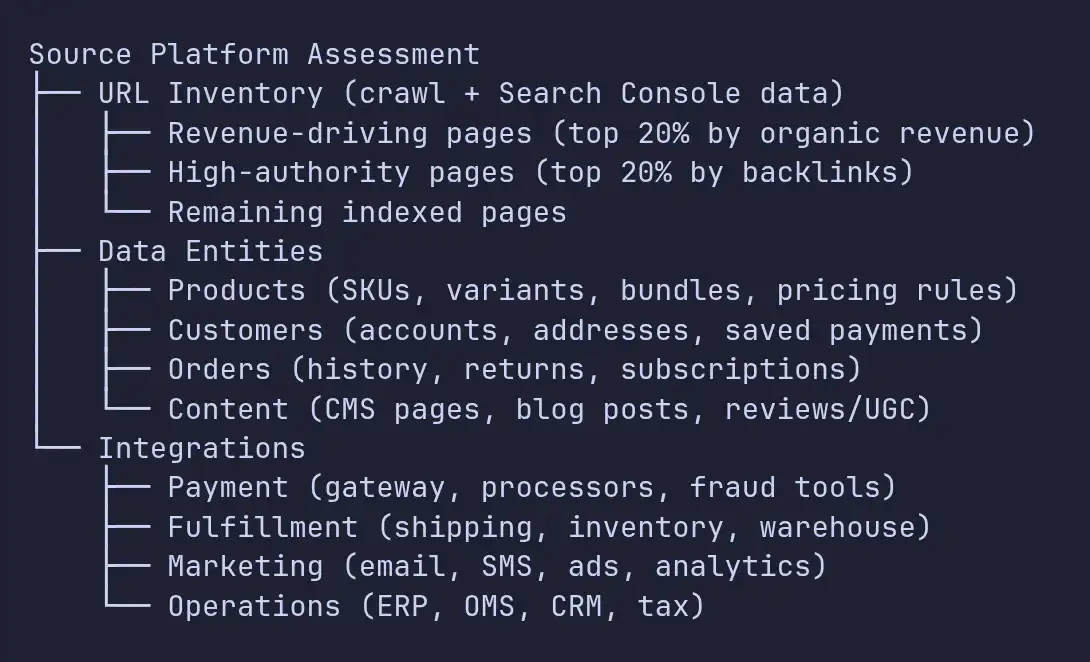
Before touching code, get the complete lay of the land.
URL inventory. Crawl your site. Build a list of every indexed URL. Check Google Search Console – see which pages really drive traffic and revenue. Not everything counts. A product page pulling in $50K/month deserves way more attention than a blog post from 2019.
Data audit. Export everything: products, customers, orders, reviews, content, existing redirects. Map out schema differences. Find the quirks – product bundles tied to old SKUs, customer accounts with wacky address formats your new platform hates.
Integration map. List all integrations: payment gateways, shipping calculators, tax logic, ERP, marketing, analytics. For each, document the current integration method (API, webhook, file-based, manual) and what the equivalent looks like on the new platform.
Phase 2: Building the Redirect Map (Week 2–4)
This part runs alongside Phase 1 and honestly, nothing matters more for protecting your revenue. The redirect map has to be spot on.
You need a one-to-one match for every old URL and its new home. It’s way more than just swapping out URL patterns - you actually have to look at what’s on each page, then figure out exactly where it belongs on the new site.
Here’s how we handle it:
- Every URL that brought in organic traffic over the past year gets a 301 redirect.
- No redirect chains. Each old URL goes straight to its new final destination.
- Category pages connect to their matching category, not just dumped onto the homepage.
- If a product is discontinued, its page points to the parent category, not a dead-end 404.
- Paginated URLs (like page 2 or 3 in a category) redirect to the main, canonical first page.
- Blog posts and content pages link directly to their new equivalents.
Once the map’s done, we double-check everything with an automated script. It crawls every old URL, follows the redirect, and makes sure the new URL returns a 200 status code. That way, nothing slips through the cracks.
import csv
import requests
from concurrent.futures import ThreadPoolExecutor

def validate_redirect(row):
    old_url, expected_new_url = row['old_url'], row['new_url']
    try:
        response = requests.get(old_url, allow_redirects=True, timeout=10)
        actual_url = response.url
        status = response.status_code
        return {
            'old_url': old_url,
            'expected': expected_new_url,
            'actual': actual_url,
            'status': status,
            'match': actual_url.rstrip('/') == expected_new_url.rstrip('/'),
        }
    except requests.RequestException as e:
        return {
            'old_url': old_url,
            'expected': expected_new_url,
            'actual': 'ERROR',
            'status': str(e),
            'match': False,
        }

with open('redirect_map.csv') as f:
    rows = list(csv.DictReader(f))

with ThreadPoolExecutor(max_workers=20) as executor:
    results = list(executor.map(validate_redirect, rows))

failures = [r for r in results if not r['match']]
print(f"Validated {len(results)} redirects. {len(failures)} failures.")
Run this before cutover, right after cutover, and then keep it daily for two weeks.
Phase 3: Data Migration with Validation (Weeks 3-8)
Don’t try to move everything at once. Take your data in chunks. For each entity-products, customers, orders-build its own pipe, and throw in validation checkpoints along the way.
Start with products: Export your whole catalog, tweak the data so it matches the new platform’s format, then import. Check your math: record counts should line up, prices need to match (grab 10% and check ‘em), variants have to stick together, images should load. I’ve watched migrations trip up-about 3% of product images disappear because the original URLs had spaces and the new CDN refused to cooperate.
Move on to customers: Get accounts over, but leave password hashes-they’re stuck to the original platform and won’t transfer. Think through the password reset flow. A poorly timed blanket email saying “reset your password” can spike support tickets and send customers running. Go slow. Let folks reset the password as they log in, not all at once.
Last comes orders and history: This is for reference-accurate records matter for support and accounting, but they don’t impact live functionality. Migrate, check your totals against accounting, and wrap it up.
Here’s how we check:
| Data Entity | Validation | Threshold |
|---|---|---|
| Products | Record count match | 100% |
| Products | Price accuracy (spot check 10%) | 100% |
| Products | Image availability | 99.5%+ |
| Customers | Account count match | 100% |
| Customers | Address format validity | 99%+ |
| Orders | Order total reconciliation | 100% |
| Reviews | Review count per product | 98%+ |
Phase 4: Parallel Running and Shadow Launch (Weeks 6-10)
This phase sorts out the biggest unknown: how your new setup handles a real, live environment.
Run the new and old platforms side by side. All real customers shop on the old platform, but the new platform gets all the same traffic (mirrored or synthetic), hitting search, browse, cart, and checkout-even if it’s just with test payment methods.
The strangler fig pattern is killer here. It’s named after the vine that wraps around a tree, slowly taking over. You gradually shift bits of functionality from the old system to the new one-never all at once. That way, you can test, tweak, and fix as you go. (This pattern is especially powerful when you're migrating to a headless or composable architecture, where individual frontend and backend services can be swapped independently.)
Week 6-7:  New platform handles product catalog pages (read-only)
           Old platform handles cart, checkout, account

Week 8:    New platform handles catalog + search + cart
           Old platform handles checkout + account

Week 9:    New platform handles everything
           Old platform available for instant rollback

Week 10:   Old platform decommissioned after validation period
At every stage, keep a close eye on how the two systems stack up:
- Make sure the new site's page load times actually improve - it needs to be faster.
- Watch how many folks drop off at each step of the conversion funnel.
- For search, check if the same queries return results that are just as good as before.
- Payment processing needs a high success rate.
If anything starts tanking, hit pause. Dig in and fix it before moving forward. That's non-negotiable. Ignoring a bad metric puts you on the fast track to months of lost revenue.
Phase 5: DNS Cutover and Monitoring (Weeks 10-12)
Once you’ve confirmed the new platform can handle real production traffic without breaking, switch your DNS over.
Pre-cutover tasks:
- Confirm every redirect sends people exactly where they need to go.
- SSL certificates should be set up and checked - don’t skip this.
- Your CDN needs to be primed, especially for the top 1,000 pages.
- Analytics and tracking codes must work and collect data properly.
- Test payments with small real transactions - no shortcuts.
- Make sure your customer service team knows about the change and possible hiccups.
- Have your rollback plan ready and tested (so you can move DNS back if things go south).
Right after cutover, for the first 72 hours:
- Check Google Search Console for crawl errors every few hours.
- Compare your live conversion rate to last week’s numbers.
- Look for sudden jumps in 404 errors.
- Watch payment success rates.
- Make sure transactional emails from the new platform actually land.
First 30 days post-cutover:
- Send your new sitemap to Google Search Console.
- Track organic traffic daily and compare to your baseline.
- Monitor keyword rankings for your top 50 money-makers.
- Check structured data with Google’s Rich Results Test.
- Keep an eye on Core Web Vitals in real customer sessions.
If you do everything right, you’ll see 90-95% of your traffic bounce back within a month, and you’re back to full strength in three months. Fix any drops quickly - missed issues that sit for months take ages to recover from.
Real Results: What Good Migration Looks Like
If you nail your migration, the payoff is huge.
Performance wins: CarBahn moved three WooCommerce shops to Shopify in just ten weeks. Load times fell from nine seconds to one. Their organic traffic and orders tripled, and average order value jumped over $200. That’s not just nice - it’s game-changing. You couldn’t get that on their old setup.
SEO done right: Simms Fishing shifted from Magento to Shopify with careful redirect mapping. Their organic traffic shot up 126% after moving. The new platform’s speed and technical SEO just blew away their old one.
Better conversions: Most businesses report, on average, a 47% boost in conversion rate and 34% higher revenue six months after a solid migration. Headless commerce setups see a 42% jump in conversions.
These results aren’t unicorns. They happen when teams treat migration as a big-picture product engineering job, not just a tech swap.
Ready to scope your migration the right way?
We've taken brands through this exact phased playbook - from URL audit and redirect mapping to parallel running and DNS cutover - without losing organic traffic or conversions in the process.
Book a free scoping call and we'll walk through your current platform, your destination, and a realistic 8-12 week migration plan with a clear budget.
The Real Migration Checklist
Here’s the streamlined checklist we stick to on every ecomm migration:
Pre-migration (Weeks 1-3):
- Crawl every URL and connect it to revenue.
- Audit all your data entities and map the schema.
- List out your integrations and their counterparts on the new platform.
- Build, review, and automatically check your redirect map.
- Record your baseline numbers: load times, conversions, organic traffic.
- Develop and test your rollback plan.
During migration (Weeks 3-10):
- Migrate data in chunks with validation gates.
- Set up and test your customer password reset plan.
- Run a parallel environment that matches production load.
- Validate each “strangler fig” routing step.
- Make sure every integration works on the new system.
- Test checkout from start to finish with real payments.
Post-cutover (Weeks 10-14):
- Validate redirects daily.
- Watch Google Search Console every four hours in the first three days.
- Track conversion rates against your original baseline.
- Submit the updated sitemap.
- Check structured data.
- Monitor Core Web Vitals in the field.
- Keep the old platform ready in case you need to roll back, for 30 days.
Lessons Learned - How We’d Tweak Our Process
No migration runs perfectly. Here’s what experience taught us:
Start redirects early: Early projects pushed redirect mapping to the end, and that’s a mistake. A store with 50,000 URLs needs weeks of careful mapping and SEO reviews. Start this in Week 1.
Plan for tricky data cases: The easy 90% of data moves quickly. The weird last 10% - partial gift cards, custom subscriptions, bundled products - takes most of your time. Don’t underestimate it.
Prep for customer questions: Password changes, new account URLs, slightly different checkouts… these spark support requests. Brief your customer service team ahead of time and prepare canned replies before you go live. Don’t wait until your inbox blows up.
We build custom ecommerce platforms and manage complex migrations for brands that have outgrown their current stack. If you're weighing a replatforming decision and want to talk through the technical approach, we'd enjoy comparing notes - get in touch with Conception Labs.


